

How Can AI Help Your Backup?
AI is moving into backup — anomaly detection, failure prediction, clean restore points. Here's what actually works today, and what still needs a human.
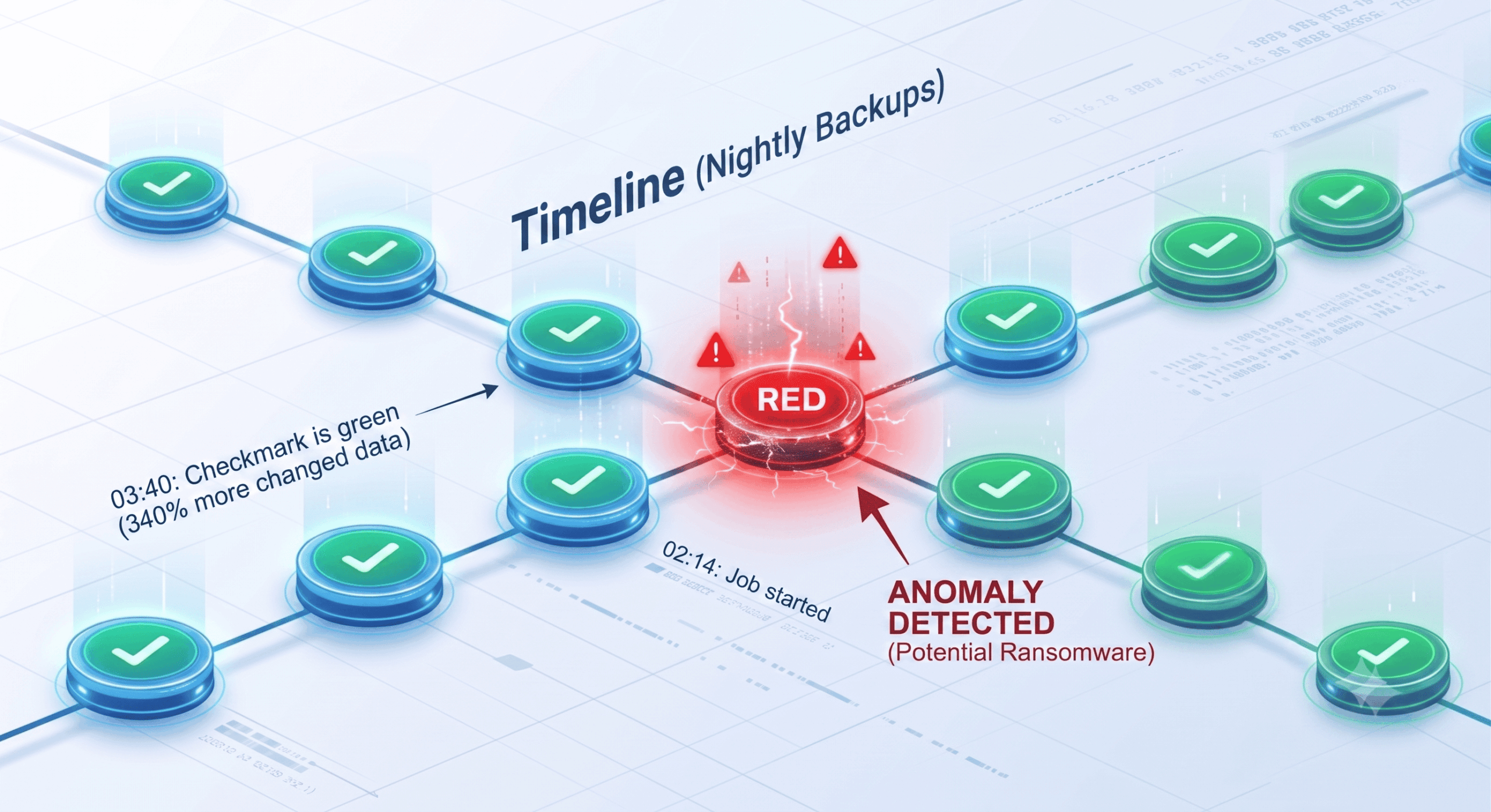
At 02:14 the nightly job starts. It finishes at 03:40 with a green checkmark. Nothing in the report looks unusual — except that this run wrote 340% more changed data than the previous eleven nights, and a large share of it is no longer compressible.
That is what a file share looks like a few hours into an encryption event. The backup captured it faithfully. The backup also had no opinion about it.
This is the gap AI is genuinely useful for. Not writing your backup policy, not replacing your retention strategy — but reading the enormous stream of signals your backup infrastructure already produces and telling you which ones matter, tonight, before the restore is the only option left.
What "AI in Backup" Actually Means Today
The term gets stretched a long way in vendor marketing, so it helps to be precise. Almost none of it is a chatbot. Most of it is machine learning applied to data your backup platform is already collecting.
Three techniques do most of the work:
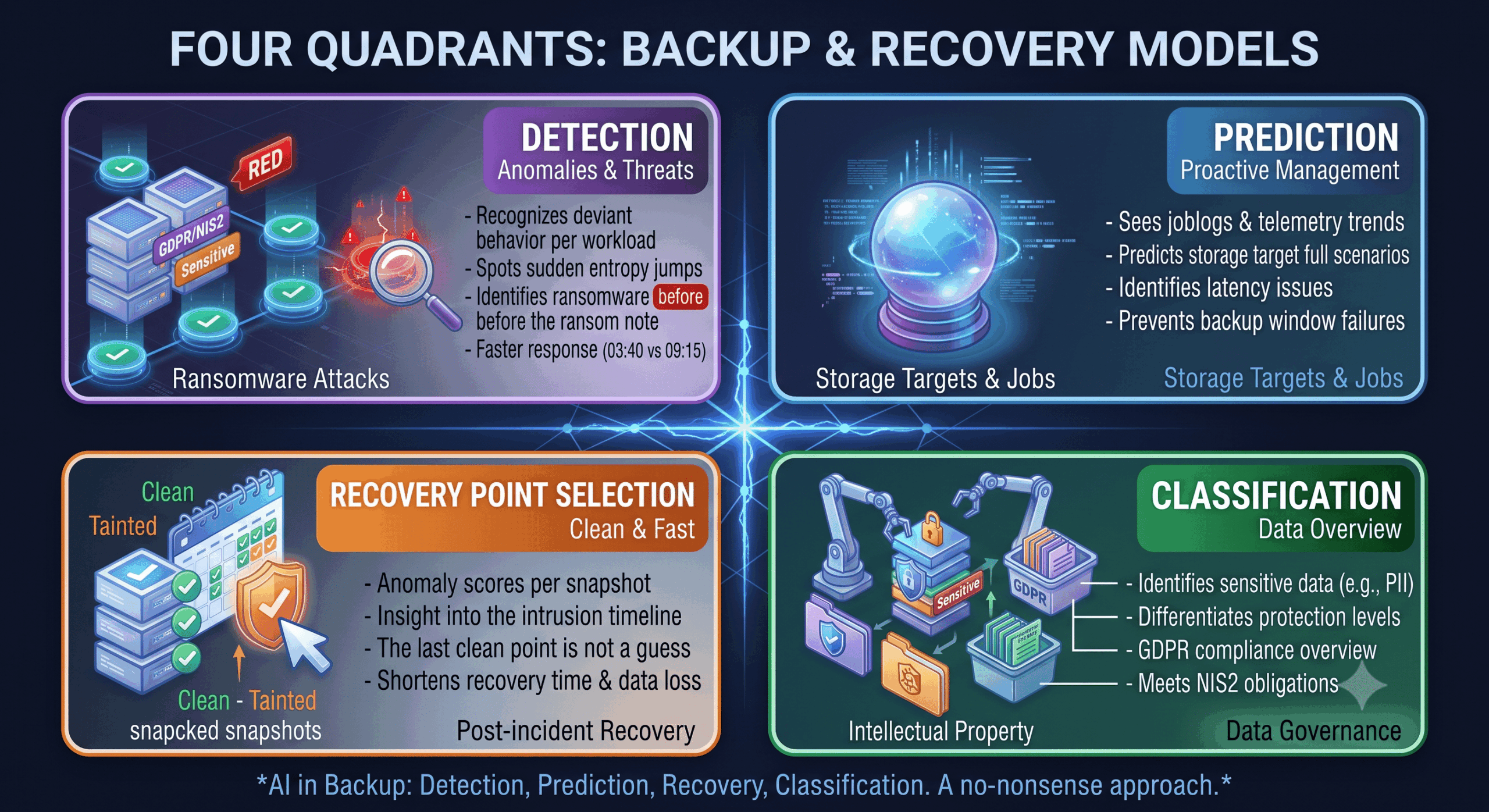
Entropy analysis. Encrypted data is close to random, so it compresses poorly. A sudden jump in entropy across a file set is one of the strongest early signals of ransomware, and it is visible in backup data before anyone notices a ransom note.
Unsupervised anomaly detection. Instead of matching known threats, the model learns what normal looks like for each protected workload — typical change rate, typical file mix, typical job duration — and flags deviation. Veeam's Ransomware Detection Service, for example, uses unsupervised machine learning built on Random Cut Forest models that learn continuously per protected object without manual retraining, covering both fast and slow "stealth" encryption profiles.
Classification models. Trained on file naming patterns, extensions, and change behaviour to separate genuine threats from ordinary noise. Arcserve takes a comparable multi-model approach, combining entropy detection, random forest classification, and isolation forest models to catch anomalous spikes in file changes while keeping false positives down.
None of this is exotic. It is statistics applied at a scale no human backup administrator could match — which is exactly the right division of labour.
Catching Ransomware in the Backup Stream
Ransomware groups have changed their timing. They now spend days or weeks stealing credentials and moving laterally before triggering encryption, and they deliberately go after backup infrastructure first. Gartner has noted that traditional disaster recovery strategies are frequently insufficient against modern ransomware precisely because attackers target the backup environment — and AI-assisted attacks are compressing the window between initial compromise and encryption still further.
Your backup platform occupies a uniquely good vantage point here. It touches every protected workload on a fixed schedule, and it has a historical baseline of exactly how those workloads normally behave. Endpoint agents can be disabled. The backup stream is much harder to make lie.
The practical effect: a warning at 03:40 instead of a discovery at 09:15. In ransomware terms those five and a half hours are the difference between isolating three servers and restoring three hundred.
Predicting Backup Failures Before They Happen
The less dramatic use case, and possibly the more valuable one day to day.
Backup jobs rarely fail without warning. They creep — the window grows by four minutes a week, retry counts tick upward, a storage target's latency drifts. Nobody spots it, because nobody reads twelve weeks of job logs looking for a trend.
Models trained on job telemetry do exactly that: flagging the job that will breach its window in three weeks, the repository heading for capacity, the agent that has been silently skipping one volume since a patch in April. This turns backup administration from reactive (something broke) to scheduled (something is drifting). For MSPs managing hundreds of tenants, this is the difference between a support model that scales and one that doesn't.
Finding a Clean Restore Point Faster
During a real incident, the slow part is almost never the copy operation. It is the decision.
If an intruder was inside the environment for nineteen days, which snapshot is clean? Restore too recent and you reinstate the payload. Restore too far back and you lose weeks of legitimate work. Teams usually resolve this by restoring candidates into an isolated environment one at a time and inspecting them — a process measured in hours or days.
Anomaly scoring per restore point compresses that. When every snapshot carries a record of how far its data deviated from baseline, the timeline of the compromise becomes visible, and the last-known-good point is a short list rather than a guess.
This is where AI has the most direct effect on your actual RTO — the number your business continuity plan promised and your recovery test may not have proven. If you have not tested that number recently, our guide on how to know if your backup actually works is the better place to start than any AI feature.
Knowing What You Are Protecting
Most organisations cannot answer a simple question: where is our personal data? Not approximately — specifically, in which shares, mailboxes, and databases.
Content classification models can scan protected data and tag what looks like personal data, financial records, or intellectual property. That has two uses. It lets you tier protection sensibly, giving your most sensitive data shorter RPOs and longer immutable retention instead of applying one blanket policy. And it produces exactly the data inventory that GDPR accountability and NIS2 risk management expect you to have — with the added benefit that it is generated from your backups rather than from a spreadsheet someone maintained by hand in 2023.
A word of caution: classification means a model reading your data. Ask where it runs. Inside your own EU backup environment is a very different answer from a public API in another jurisdiction, and for regulated data the difference is not academic.
Where AI Does Not Help
Four honest limits, because a post that only lists benefits is a brochure.
It cannot back up what was never in scope. The most common recovery failure is not detection — it is a system that was never included in the backup at all. No model finds data that was never copied. That is a scoping problem, solved by a recovery inventory and a human who reads it.
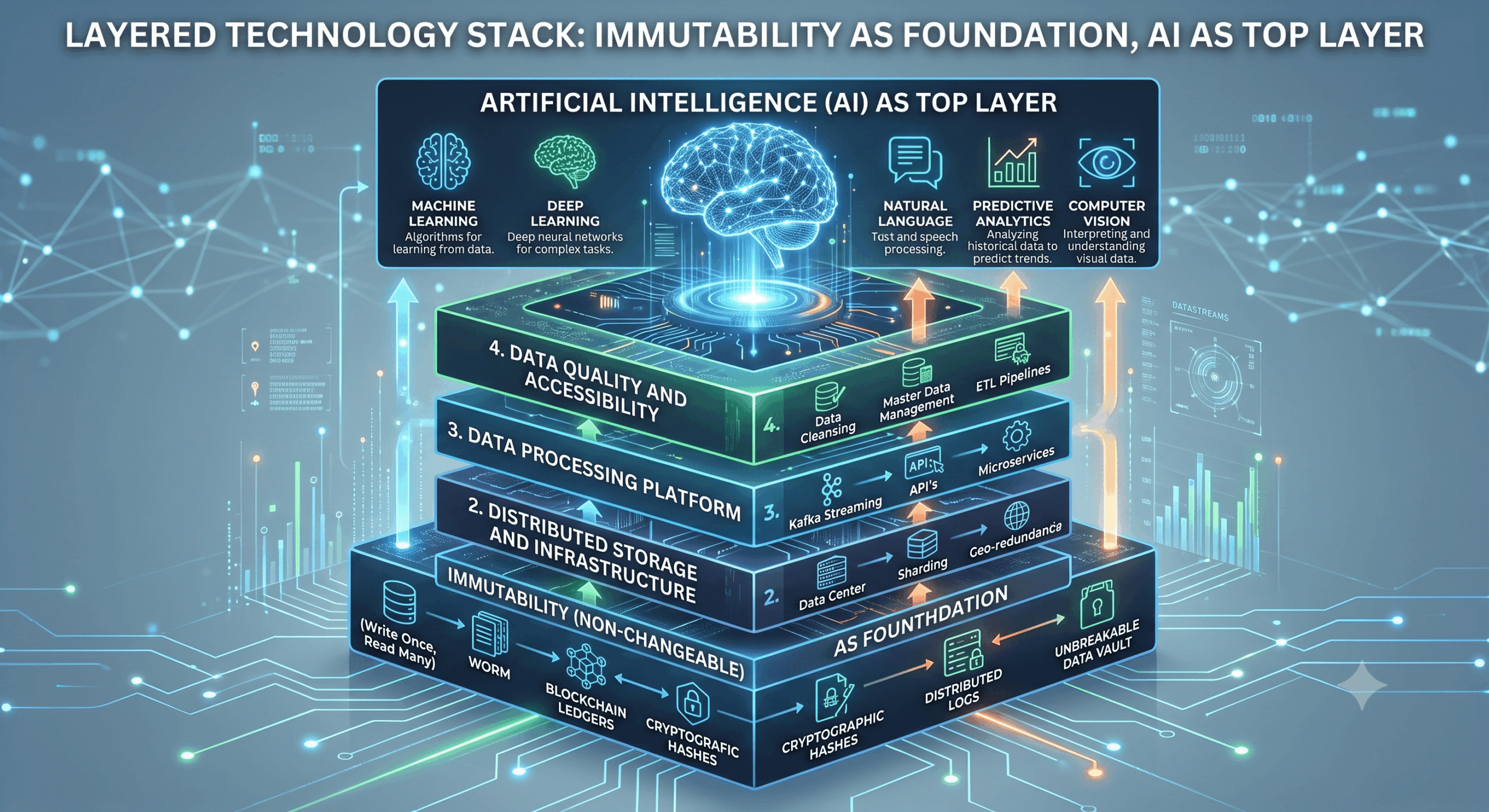
Detection is not protection. An alert is worth nothing if the attacker can then delete the backups. Immutability remains the control that actually stops the attack; AI tells you sooner that you will need it. Ordering matters — get immutable storage right first, then add intelligence on top.
False positives have a cost. A model that flags every quarterly data migration as an encryption event trains your team to click away alerts. Tuning against your own baseline is not optional, and it takes a few months of real data.
Attackers have the same tools. AI-assisted intrusion is shortening dwell time on the offensive side too. This is not a race anyone wins permanently; it is a floor that keeps rising.
Where to Start
You do not need a project for this. In order:
Check what you already own. Anomaly detection ships in most current backup platforms and is frequently switched off or unconfigured. Free capability first.
Give it a baseline. These models need several weeks of normal operation before their output is worth acting on. Turn it on now so it is useful later.
Decide who receives the alert. An anomaly warning at 03:40 that lands in an unmonitored mailbox is not a control. Route it to the same place your security alerts go.
Test the workflow, not just the feature. Run a recovery test where the restore point is chosen using the anomaly data. That is the moment you learn whether the signal is trustworthy.
Document it. If you fall under NIS2, automated detection and periodic recovery testing are both evidence a regulator will ask for. Keep the records as you go, not afterwards.
AI Beyond the Backup
Backup is one of the clearer places to apply AI, because the data is structured, the baseline is stable, and the payoff is measurable. Most organisations have several other processes with the same profile — quoting, invoicing, support triage, document handling — and no obvious idea where to begin.
If that is the broader question you are sitting with, our specialised AI partner Top-AI works with Dutch SMEs on exactly that: identifying which processes are worth automating and building the ones that pay off, at fixed prices. Their AI Quick Scan delivers a costed implementation plan in a week. Different problem, same no-nonsense approach.
Conclusion
AI does not make your backup strategy. It makes your existing backup strategy observable.
The value is concentrated in the parts of backup that were always uncomfortably manual: noticing that something changed, noticing that something is degrading, and deciding which restore point to trust at three in the morning. Those are pattern-recognition problems at a scale humans are genuinely bad at, and machines are genuinely good at.
What has not changed is everything underneath. Correct scope. Immutable copies. Tested recovery. Documented procedures. AI applied on top of those makes a strong position sharper. Applied instead of them, it produces a very intelligent description of a failure you were going to have anyway.
Frequently Asked Questions
Can AI detect ransomware in my backups?
Yes, and this is the most mature AI use case in backup today. Detection works by analysing how your data changes rather than by matching known malware — a sudden rise in data entropy, an abnormal change rate, or unusual file extension patterns compared to that workload's own history. Because the backup platform touches every protected system on a fixed schedule and holds a long behavioural baseline, it often sees encryption activity earlier than endpoint tooling, and it remains visible even if an endpoint agent has been disabled.
Does AI replace the need for immutable backups?
No. Detection and protection are different controls. AI shortens the time between a ransomware attack starting and someone knowing about it; immutability is what prevents the attacker from destroying your recovery capability in the meantime. Attackers routinely target backup infrastructure first, so immutable storage remains the foundation. AI is a layer on top of it, not a substitute for it.
Is it safe to let AI analyse my backup data under GDPR?
It depends entirely on where the processing happens. Anomaly detection based on metadata and statistical properties — change rates, entropy, job telemetry — generally does not require reading file contents. Content classification does. For either, ask your provider where models run, whether data leaves the EU, and whether anything is retained for training. Processing inside an EU-hosted backup environment under a clear data processing agreement is a materially different risk position from sending data to an external API.