

Immutable Backups: The M365 Copy Ransomware Can't Touch
If a stolen admin credential can delete it, it isn't a backup — immutability is what makes Microsoft 365 data truly recoverable.
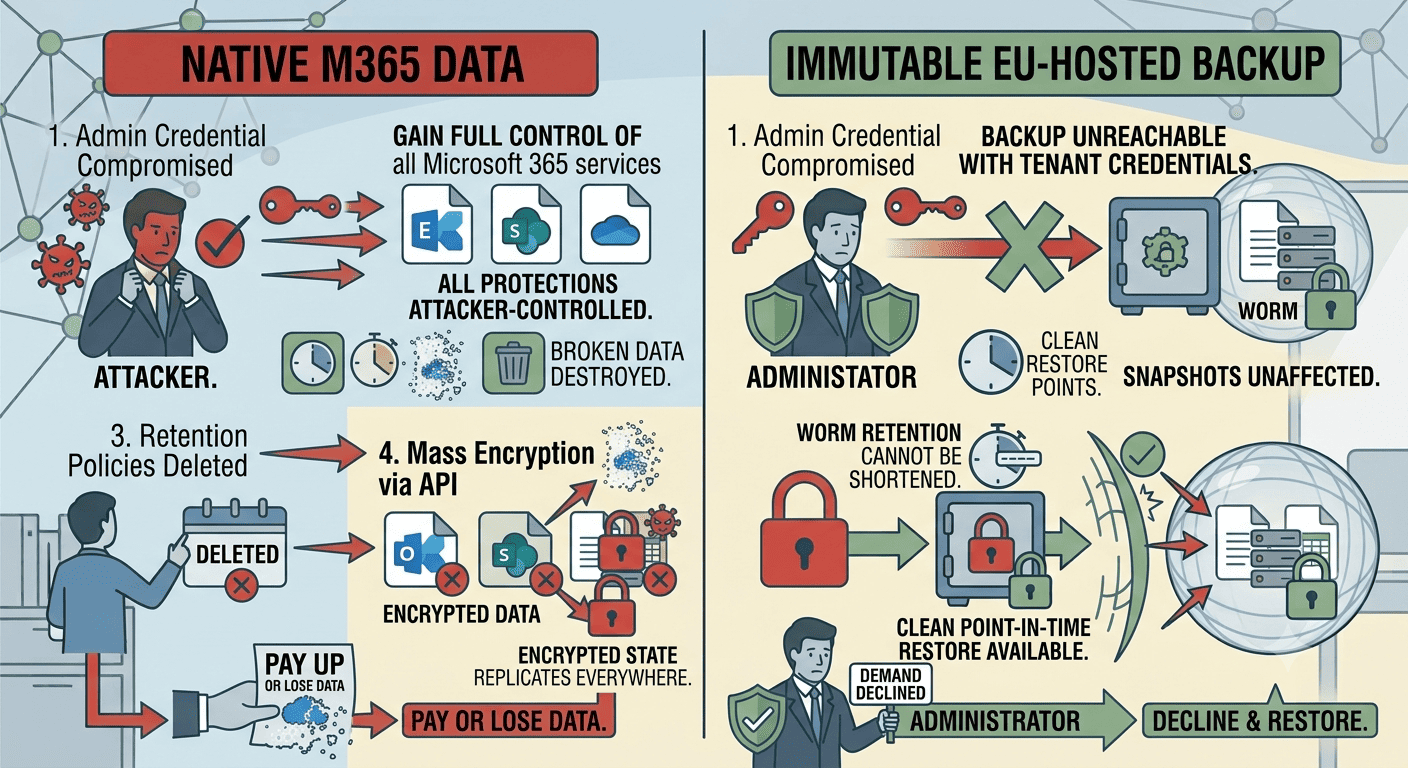
The attack doesn't start with encryption. It starts with a compromised admin account quietly doing housekeeping: shortening retention policies, purging recycle bins, deleting version histories. Only when the safety nets are gone does the ransomware run — encrypting SharePoint libraries and OneDrive folders through perfectly legitimate API calls. When the victim reaches for their native recovery options, they find the attacker got there first.
This sequence has become standard ransomware tradecraft, and it works because Microsoft 365's built-in protections share a fatal property: they can be modified by anyone holding sufficient credentials. Identity-based attacks — the most common path in — hand attackers exactly those credentials.
The misconception to bury: retention policies and versioning are backup. They are conveniences that survive accidents, not controls that survive adversaries. Against an attacker with admin access, only a copy that nobody can alter — immutable, stored outside the tenant — holds the line.
What Makes a Backup "Immutable"?
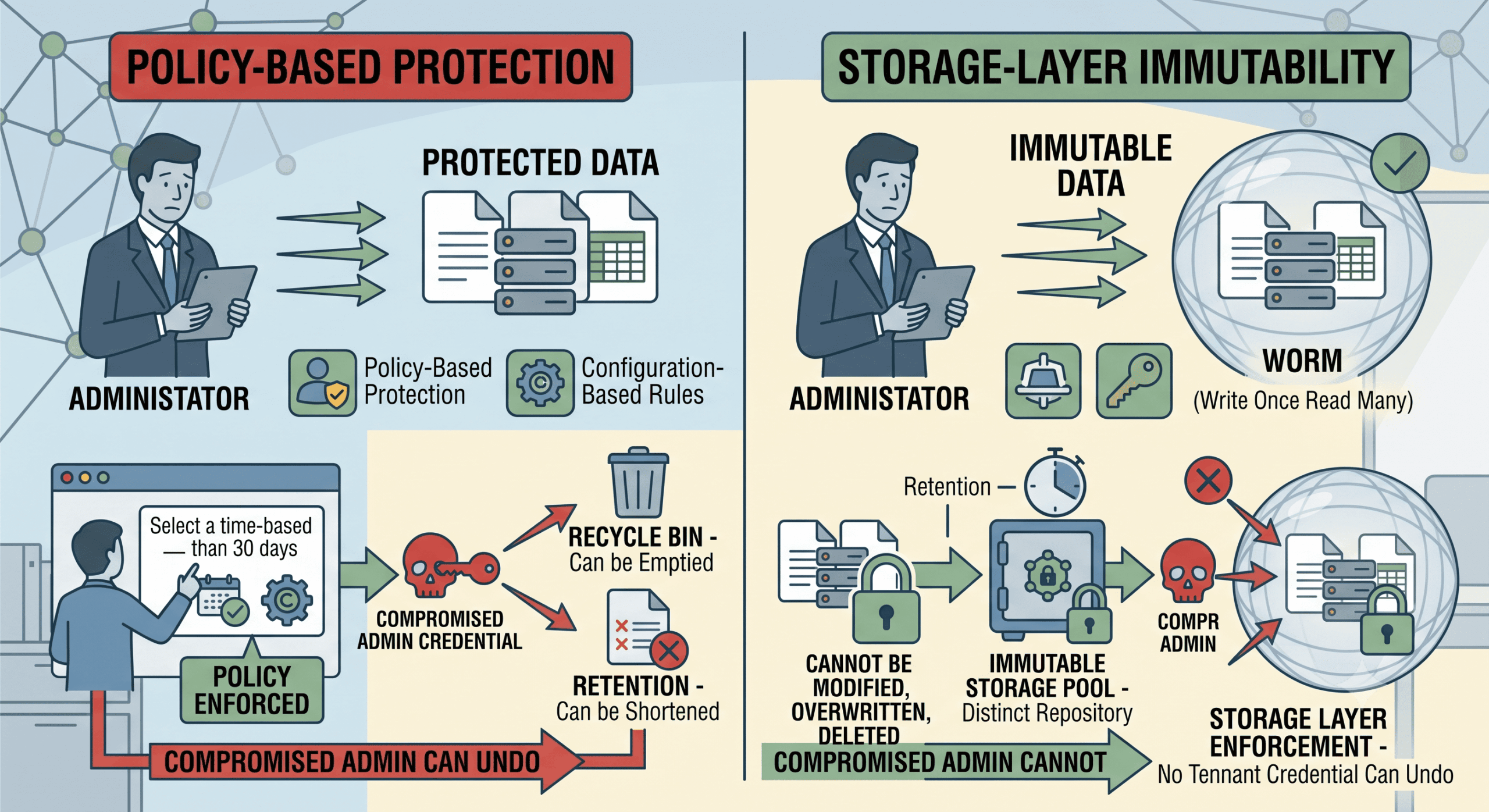
An immutable backup is a copy written to storage that technically enforces write-once-read-many (WORM) semantics: for the duration of its retention period, the data cannot be modified, overwritten, or deleted — not by ransomware, not by a compromised administrator, not by the backup operator.
Immutable vs. Merely "Protected"
The distinction is enforcement. A recycle bin is protected by policy — an admin can empty it. A retention rule is protected by configuration — an admin can shorten it. An immutable snapshot is protected by the storage layer itself: there is no credential in your tenant, or in your backup console, that can undo it before retention expires. That property is what separates surviving an accident from surviving an attack, because attackers arrive holding your credentials, not their own.
Can't Microsoft 365's Built-in Tools Handle Ransomware?
Not against a competent operator. The native toolset — version history, recycle bins, retention and preservation policies — assumes the actor doing damage is unprivileged or accidental. Modern intrusions violate that assumption at step one: according to Microsoft's Digital Defense Report, identity attacks occur at massive scale — with password-based attacks making up the overwhelming majority — precisely because a valid credential converts every "protection" into a setting the attacker controls.
Once inside with elevated rights, the playbook is mechanical: purge version histories, empty recycle bins, shorten or delete retention policies, then encrypt via API or synced clients. Files replicate to Microsoft's redundant infrastructure exactly as designed — encrypted. Availability remains perfect; recoverability is gone. The shared responsibility model means this outcome is contractually your problem, not Microsoft's.
What's at Stake: The Business Case in Three Layers
Operationally, an unrecoverable M365 tenant stops the company: mail, files, Teams, and every process built on them. Financially, the exposure compounds — the majority of modern ransomware incidents also involve data exfiltration, stacking extortion on top of downtime, against a global average breach cost of USD 4.88 million according to IBM's Cost of a Data Breach Report.
Regulatory and insurance pressure completes the picture. GDPR requires the ability to restore availability of personal data in a timely manner; the NIS2 Directive names backup management among mandatory risk-management measures, with management bodies personally accountable. Cyber insurers, having paid for years of failed recoveries, increasingly condition coverage on exactly one artifact: proof of immutable, tested, independently stored backups.
How to Deploy Immutable M365 Backups: A Five-Step Plan
Audit the identity layer first. Enforce phishing-resistant MFA, disable legacy authentication, and review admin role assignments — immutable backups are the last line, not a substitute for making entry harder.
Deploy an independent backup outside the tenant. Implement a dedicated Microsoft 365 backup covering Exchange, SharePoint, OneDrive, and Teams, with separate credentials and no trust relationship with your production admin accounts.
Turn immutability on and calibrate retention. Write daily snapshots to WORM storage with retention matched to your obligations — and to realistic ransomware dwell times, so clean restore points exist from before any plausible intrusion window.
Keep the copies under EU jurisdiction. Dutch or German data centers under European ownership keep backups aligned with GDPR residency expectations and outside the scope of the US CLOUD Act — a growing requirement in data security reviews and tenders.
Test restores quarterly, against the clock. Restore mailboxes and sites to an isolated target, measure RTO against your targets, and file the report — the artifact that satisfies NIS2 auditors and insurers, and proves your ransomware protection works before the day it must.
Native Tools vs. Immutable Backup Under Attack
| Attack step | Native M365 tools | Immutable EU-hosted backup |
|---|---|---|
| Admin credential compromised | All protections now attacker-controlled | Backup unreachable with tenant credentials |
| Versions & recycle bins purged | Recovery options destroyed | Snapshots unaffected |
| Retention policies deleted | Long-term copies gone | WORM retention cannot be shortened |
| Mass encryption via API | Encrypted state replicates everywhere | Clean point-in-time restore available |
| Ransom demand | Pay or lose data | Decline and restore |
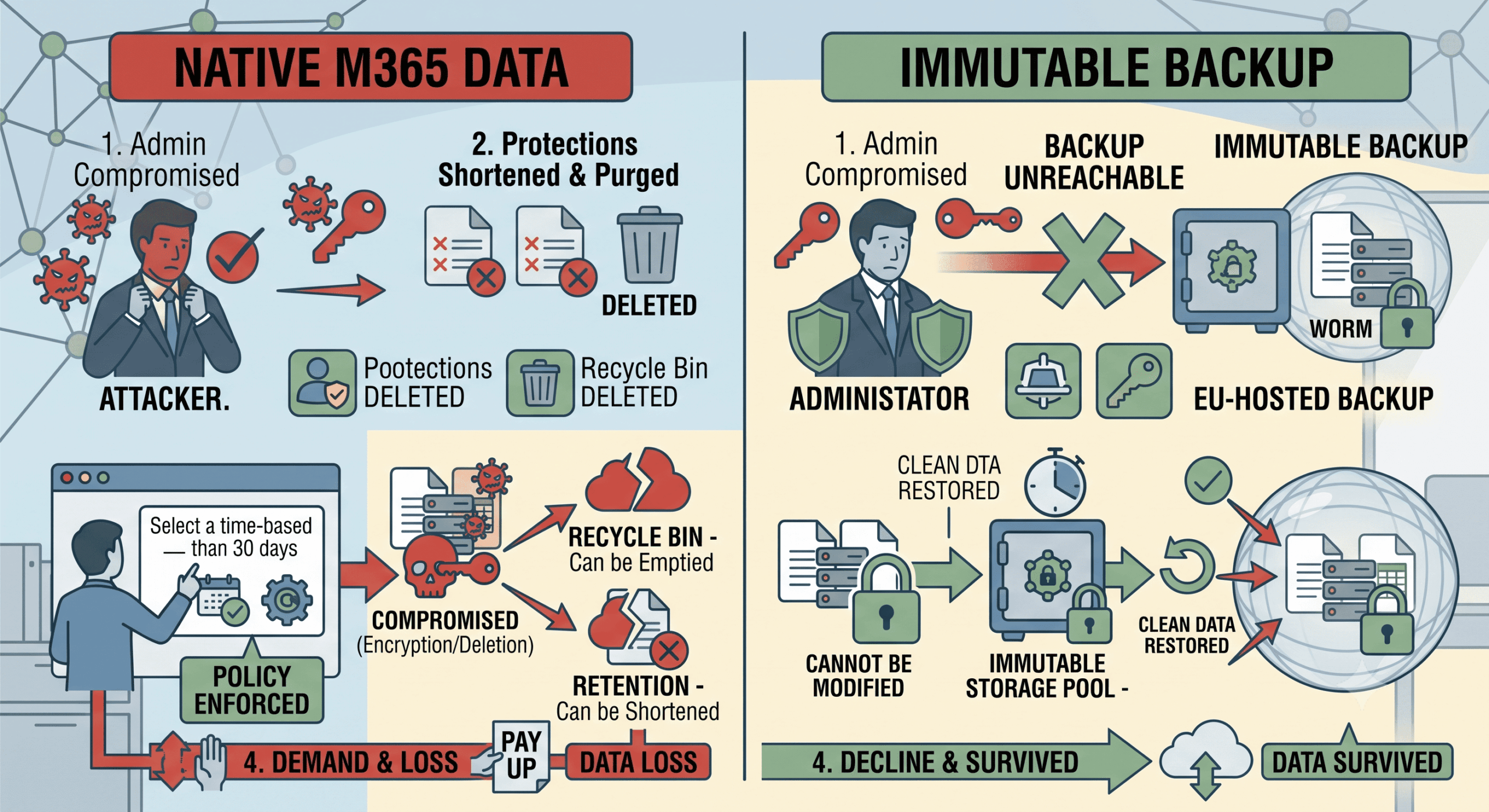
The last row is the point of the entire architecture: immutability converts the ransom conversation from a negotiation into a non-event. Every row above it explains why nothing weaker achieves that.
Conclusion
Ransomware operators don't defeat Microsoft 365's protections — they log in and turn them off. That is why the deciding control isn't another detection layer but a copy of your data that no credential can touch: immutable, independently stored, EU-hosted, and tested until restore times are boring. Everything else in the defense stack lowers the odds of the bad day; immutability decides what the bad day costs. If you'd like to know whether your current M365 backup would survive an attacker with admin rights, that's a question worth answering now — we're happy to help you test it.
Frequently Asked Questions
What is an immutable backup?
An immutable backup is a data copy written to storage that enforces write-once-read-many (WORM) rules: for its retention period, the copy cannot be altered, encrypted, or deleted by anyone — including administrators and the backup operator. This makes it fundamentally different from recycle bins or retention policies, which are settings that a compromised admin account can change. Immutability is enforced by the storage layer, not by policy.
Why can ransomware delete Microsoft 365 backups and versions?
Because native protections are controlled by tenant credentials, and ransomware operators typically compromise privileged accounts before encrypting anything. With admin rights, an attacker can purge version histories, empty recycle bins, and shorten or remove retention policies through legitimate administrative functions — then encrypt data via APIs or synced clients. Any protection reachable with your credentials must be assumed attacker-controlled in a serious incident.
Do immutable backups help with GDPR and NIS2 compliance?
Yes. GDPR Article 32 requires the ability to restore availability and access to personal data in a timely manner, and NIS2 explicitly mandates backup management and tested business continuity measures. Immutable backups with documented quarterly restore tests provide exactly the evidence these frameworks — and cyber insurers — ask for. Hosting the copies in EU-jurisdiction data centers additionally addresses data sovereignty expectations and CLOUD Act concerns.